Understanding the Data in Google Analytics Tables
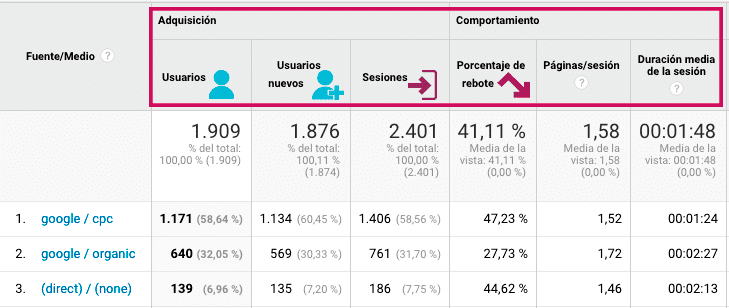
 Users
Google defines a user as a person who interacts with an app or a website whose activity is measured with Google Analytics. This is not the same as a Google Ads click or a hit. A user is a person who can generate more than one session on the site. Unique users are defined by the cookies left on the user's device or browser.
 New users
Using the cookies installed on your visitors' devices, Google Analytics can identify whether a visitor has been to your site before.
 Session
"The period of time a user is active on your site. By default, if a user is inactive for 30 minutes or more, any future activity is attributed to a new session. Users who leave your site and return within 30 minutes are counted as part of the original session."
 Bounce
A bounce occurs when a single-page session takes place on a website. In Universal Analytics, a bounce was calculated as a session that triggered only a single request to the Analytics server, for example when a user opened a single page of the site and left without triggering any other request during that session. In Google Analytics 4, the bounce rate is the percentage of sessions that were not engaged sessions, that is, the inverse of the engagement rate.
Would you like us to interpret these metrics for your site? See our Google Analytics consulting service.


